

Before a customer ever visits your website, most of them will see your Google Business Profile first — your hours, photos, reviews, and a map pin, all sitting right in the search results. For a huge share of small businesses, this free listing does more daily work than the website does.
The problem is that most profiles are set up once, left half-finished, and never touched again. This guide walks through every part of Google Business Profile (GBP) optimization — from verification to reviews — in the order you should actually do it, so your listing works as hard as it can for you.
What Is a Google Business Profile?

A Google Business Profile is a free listing that controls how your business appears across Google Search, Google Maps, and Google’s local search features, including the “local pack” (the map and three-listing block that appears for searches like “bakery near me”). It shows your name, address, phone number, hours, photos, services, and customer reviews.
Google has confirmed that local rankings are decided by three factors: relevance (how well your listing matches the search), distance (how close you are to the searcher), and prominence (how well-known and trusted your business is). You can’t change your distance from a customer, but a well-optimized GBP directly improves both relevance and prominence — which is why it’s typically cited as the single highest-weighted factor in local search rankings, ahead of website content, backlinks, and citations.
Step 1: Claim and Verify Your Profile
Nothing else in this guide works until your profile is verified. An unverified listing can’t appear reliably in the local pack, and you can’t edit attributes, respond to reviews, or use messaging.
Go to google.com/business and search for your business name and address. If a listing already exists (sometimes created automatically from public data), claim it. If not, create a new one.
Verification methods available in India:
- Phone or SMS verification — the fastest option when Google offers it. A code is sent instantly to your registered business number.
- Email verification — available for some businesses; a code is sent to your business email.
- Video verification — increasingly the standard method for new listings and service-area businesses. You’ll record a short walkthrough showing your storefront, signage, and interior to prove you operate at the claimed location.
- Postcard verification — Google mails a physical postcard with a 5-digit code to your business address. In India this can take two to three weeks, and delivery is less reliable in smaller towns and semi-urban areas. Don’t edit your business name, address, or category while a postcard is in transit — doing so can invalidate the code.
If your postcard doesn’t arrive within around three weeks, request a new one from your dashboard rather than waiting indefinitely — but note that each new request cancels the previous code. Where Google offers phone or video verification, take it; it’s faster and more reliable for most Indian businesses than waiting on postal delivery.
Step 2: Get the Core Business Information Right
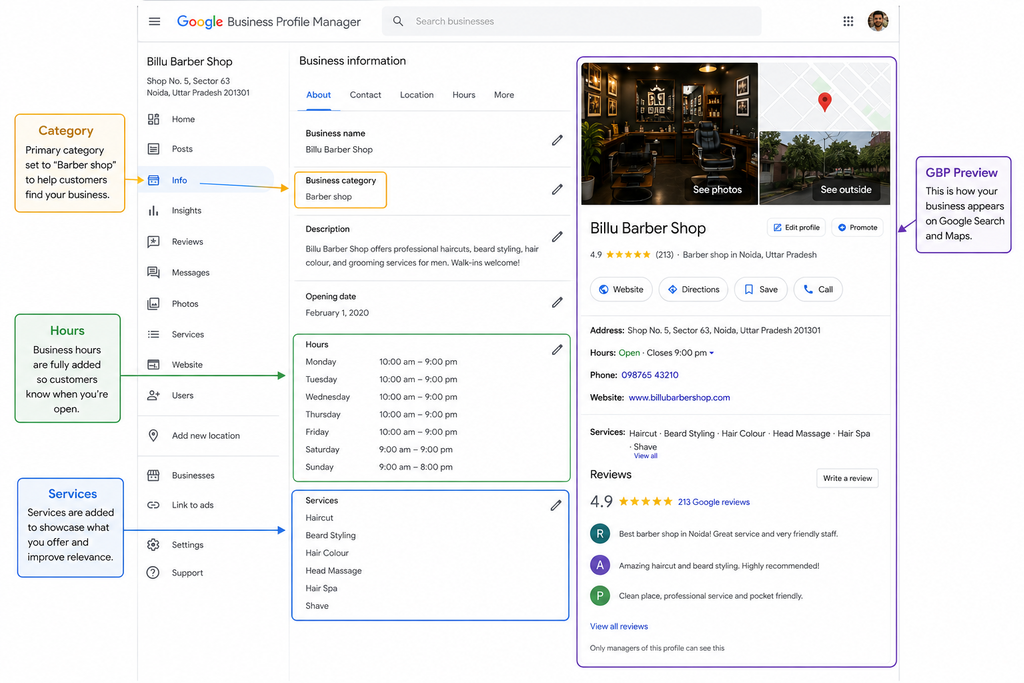
Once verified, fill in every field completely. Incomplete profiles are shown far less often — industry data cited by multiple GBP optimization guides puts the drop-off at roughly five times fewer views for incomplete listings compared to fully completed ones.
- Business name — must match your real-world signage exactly. Do not add keywords or location terms (“Sharma Electricals — Best Electrician in Pune 24/7”) — this violates Google’s guidelines and is one of the most common reasons profiles get suspended.
- Address — accurate, correctly formatted, and matching your website and directory listings exactly (see NAP consistency below). If you’re a service-area business without a walk-in storefront (plumber, electrician, home cleaner, mobile beautician), use the service-area setting and hide your public address rather than listing a fake or shared one.
- Phone number — a working local number, ideally the same one used on your website and other listings.
- Hours — including special hours for festivals and holidays. A listing that shows “closed” during actual business hours actively loses customers in real time, and Google has been observed adjusting visibility based on whether a business currently appears open.
- Website URL — link to your homepage, or a relevant service/location page if that’s more useful to the searcher.
- Service area (if applicable) — the specific cities, neighborhoods, or radius you serve.
Step 3: Choose the Right Categories
Your primary category is consistently identified as the single most influential local ranking factor, so this is worth getting exactly right rather than approximating.
- Choose the most specific category that accurately describes your core business. “Dental Clinic” outperforms “Doctor.” “North Indian Restaurant” outperforms “Restaurant.” A vague or overly broad category makes Google’s relevance matching weaker for every specific search you’d want to appear in.
- Add secondary categories only where they genuinely apply — a spa offering massage therapy can reasonably add both categories. Don’t add categories to try to appear in more searches; Google treats irrelevant categories as a spam signal and it can hurt your relevance for the searches that actually matter.
- Review your categories every few months as your services evolve. A salon that starts offering bridal makeup, for example, may want to add that as a specific service and secondary category rather than relying on the general “Beauty Salon” tag alone.
Step 4: Write a Description That Works for People and Google
You have roughly 750 characters for your business description. Use it to explain, in plain language, what you do, who you serve, and where — not to repeat your keyword as many times as possible.
A useful structure: what you do → who it’s for → what makes you different → your service area. For example:
“[Business Name] is a [type of business] in [locality, city] offering [core services]. We’ve served [city/area] since [year], known for [specific differentiator — same-day service, specific expertise, etc.]. We serve [neighborhoods/service area].”
Mention your city and locality naturally once or twice — don’t force the exact phrase “best [service] near me” into the copy. Google’s systems, and human readers, both respond better to a description that reads like it was written by someone who actually knows the business.
Step 5: Add Services and Products in Full Detail
The Services (and, where relevant, Products) section is one of the most under-used parts of GBP, and it directly feeds Google’s relevance matching for specific queries.
- List every individual service separately, with a short description. A salon should list “bridal makeup,” “hair spa,” “keratin treatment,” and “haircut” as distinct entries — not just “salon services.”
- Add price ranges where you’re comfortable sharing them; this reduces friction for customers deciding whether to contact you and can improve how your listing surfaces for price-conscious searches.
- Update this section whenever your service list changes — an outdated list undersells what you actually offer and can misalign your relevance signals with your current business.
Step 6: Upload Photos and Videos Consistently
Photos are one of the highest-leverage, lowest-effort parts of GBP optimization. Businesses with photos receive meaningfully more requests for directions and website clicks than those without, according to data widely cited in Google Business Profile research (roughly 42% more direction requests and 35% more website clicks for profiles with photos versus none).
Upload and keep refreshing:
- Exterior shots — so customers recognize your storefront from the street
- Interior shots — waiting areas, treatment rooms, dining areas, workshop space
- Team photos — builds trust and human connection before the first interaction
- Work/product photos — actual dishes, finished repair jobs, before-and-after shots for salons and home services, property photos for real estate listings
- Short videos — a quick walkthrough of your space or process performs well and is still underused by most competitors
Avoid stock photography. It’s usually obvious to both customers and to Google’s systems, and it undercuts the authenticity that photos are meant to provide.
Step 7: Use Posts, Attributes, and Q&A Actively

A profile that’s updated once and never touched again sends a weaker freshness signal than one with regular activity. Google’s systems in 2026 increasingly weigh recent activity — posts, photos, and review flow — alongside the static profile fields.
- Posts — share offers, events, new services, and updates. A weekly cadence is a reasonable target for most small businesses; even a biweekly post is better than none. Festival and seasonal posts (Diwali hours, monsoon service offers, wedding-season availability) are a natural fit for Indian businesses and tend to get strong engagement.
- Attributes — accurately mark relevant attributes: wheelchair accessibility, women-led business, outdoor seating, home visits, online consultation, and similar filters customers actually use to narrow results.
- Q&A — monitor this section and seed it with the 4–5 questions customers ask most often (parking, walk-ins, insurance accepted, advance booking required) so incorrect answers from strangers don’t sit unchallenged. Anyone can post or answer questions here, which makes proactive monitoring important.
Step 8: Turn On Messaging and Booking Where Relevant
If your business type supports it, enable direct messaging so customers can reach you without leaving Google, and connect a booking link (appointment scheduling, table reservations, or a service request form) if you use one. This shortens the path from “found you” to “contacted you” — particularly valuable for salons, clinics, and restaurants, where booking friction is often the difference between a click and a customer.
Step 9: Generate and Respond to Reviews
Reviews function as both a ranking signal (prominence) and the leading factor customers cite when deciding whether to contact a business. A profile with strong information but few or stale reviews will consistently lose to a well-reviewed, actively-managed competitor.
- Ask right after a positive interaction — checkout, end of service, or discharge — rather than in a delayed bulk request.
- Make it effortless — share your direct Google review link via WhatsApp or SMS, the channel most Indian customers actually respond to.
- Never buy or incentivize fake reviews. This is one of the fastest ways to trigger a suspension, and it damages trust with real customers who can usually tell.
- Respond to every review, positive and negative, within a few days, with a specific, non-templated reply. A thoughtful response to a negative review measurably improves how prospective customers perceive the business, even if they never read the original complaint in detail.
For a deeper look at earning and managing reviews specifically, see our dedicated guide on getting more Google reviews for your small business (linked below).
A Simple GBP Optimization Checklist
Use this as a running reference — the first block is a one-time setup; the second is ongoing maintenance.
Set up once:
- Claim and verify the profile
- Confirm business name matches signage exactly (no keyword stuffing)
- Set the correct primary category and any genuinely relevant secondary categories
- Complete address, phone, hours, and website
- Write a clear, natural-language business description
- Set service-area settings if you don’t have a walk-in storefront
Maintain ongoing:
- List and update all services/products with descriptions
- Add new photos regularly (at least monthly)
- Post updates weekly or biweekly
- Monitor and answer the Q&A section
- Ask for reviews consistently and respond to all of them
- Review Insights monthly to track calls, direction requests, and search terms
How Often Should You Update Your Google Business Profile?
Treat GBP as an active channel, not a one-time listing. A reasonable cadence for most small businesses:
- Weekly: Post an update if you have one worth sharing (offer, new item, event)
- Weekly/biweekly: Respond to any new reviews and Q&A entries
- Monthly: Add fresh photos and review your Insights data
- Quarterly: Re-check NAP consistency, category accuracy, and service list completeness
Profiles that go quiet for extended periods often see a gradual decline in impressions, even without any change to the underlying business information — activity itself is part of the signal.
Common Mistakes That Get Profiles Suppressed or Suspended
- Keyword-stuffing the business name — the single most common cause of suspension
- Listing a fake or shared address to appear in multiple areas, instead of using the service-area setting
- Creating duplicate listings for the same location, which splits reviews and confuses both Google and customers
- Leaving categories, hours, or the service list incomplete for months at a time
- Buying reviews or using review-gating (only asking happy customers, filtering out unhappy ones before they can post) — both violate Google’s policies
- Ignoring the Q&A and review sections, allowing inaccurate answers or unaddressed complaints to sit publicly
Frequently Asked Questions
How long does it take to verify a Google Business Profile in India?
Phone or video verification is usually resolved within a few hours to a few days. Postcard verification typically takes two to three weeks in India and can take longer in smaller towns with less reliable postal delivery.
Do I need a website if my Google Business Profile is fully optimized?
Yes. A strong GBP gets you found and contacted quickly, but a website still matters for organic rankings below the local pack, building topical authority, and giving customers a place to verify details, pricing, or credentials before they commit.
How many photos should I upload to my Google Business Profile?
There’s no fixed number, but consistency matters more than volume — a steady stream of new, real photos over time (rather than a one-time bulk upload) signals an active, currently-operating business.
Can I edit my business category after verification?
Yes, categories can be changed at any time from your GBP dashboard. Review them periodically as your services change, but avoid frequent, unnecessary changes, which can create instability in how Google matches your listing to searches.
What happens if my Google Business Profile gets suspended?
You’ll lose visibility in Search and Maps until it’s resolved. Most suspensions stem from policy violations like keyword-stuffed names, fake addresses, or manipulated reviews. Google provides a reinstatement request process through the Business Profile support pages — review the specific violation cited, fix it, and submit an appeal with accurate information.
Important External Sources / References
- Google — Improve your local ranking on Google (official documentation on relevance, distance, and prominence)
- Google Business Profile Help — verification methods and requirements
- Whitespark / BrightLocal — Local Search Ranking Factors survey (annual expert survey on GBP and local ranking weight)


